Actions
Bug #4554
open
RR
NV
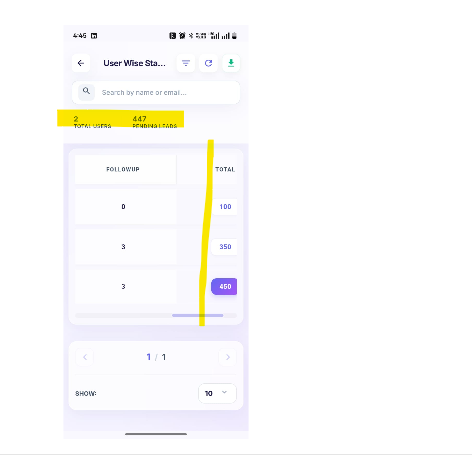
Mobile APP: User Wise Lead Status Report Alignment Is Not Properly Configured
Bug #4554:
Mobile APP: User Wise Lead Status Report Alignment Is Not Properly Configured
Start date:
Due date:
% Done:
0%
Estimated time:
Description
Steps to Reproduce
- Login to the Mobile App with valid credentials.
- Navigate to the Reports section.
- Select User Wise Lead Status Report.
- Generate/view the report.
- Observe the alignment of the report headers and corresponding data.
- Verify the alignment of all columns and values.
Actual Result:
The columns and data in the User Wise Lead Status Report are not properly aligned.
Expected Result:
All headers, columns, and corresponding values should be properly aligned and displayed consistently.
arockia@yopmail.com
Welcome@123
Files
NV Updated by nandhini v 9 days ago
- Status changed from New to In Progress
NV Updated by nandhini v 2 days ago
- Status changed from In Progress to Resolved
Actions